> ## Documentation Index
> Fetch the complete documentation index at: https://docs.trymaitai.com/llms.txt
> Use this file to discover all available pages before exploring further.
# Agent Flow Steps
> The reasoning loop, step by step, and how to configure each one
Agents in `reasoning` mode process every request through a pipeline of **flow steps**. The entire pipeline is exposed on the agent's **Configuration** tab, there are no hidden system instructions. Each LLM-powered step is a card you can open, inspect, and customize: what you see in the pipeline is exactly what runs.
## The pipeline
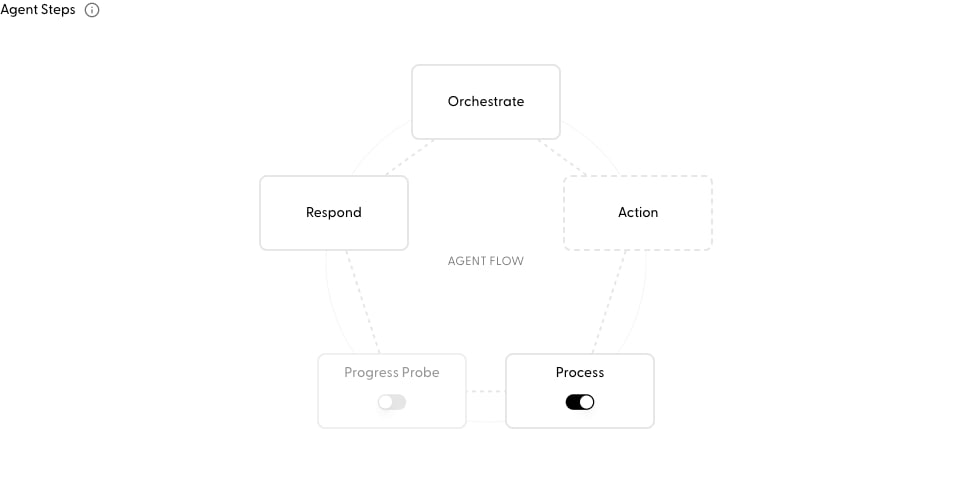 | Step | Required | What it does |
| ------------------ | ------------------------ | --------------------------------------------------------------------------------------------------------------------------------------------------------------------------------------------------------------------------------------------------------------------------------------------------------------------------------------------------------------------------------- |
| **Orchestrate** | Yes | Plans the next move, reviews the request, current [state](/build/agents/agent_state), and prior results, then picks one capability to run. |
| **Action** | Yes | Where your capabilities execute (API calls, LLM calls, workflows, webhooks, sub-agents). Not an LLM step, manage these on the **Capabilities** tab. |
| **Process** | Optional, on by default | Distills each action result into a rolling summary and findings, and writes state updates. Two sub-calls: **Summary & Findings** and **Form Updates**. Disable it to keep a raw message transcript instead. |
| **Progress Probe** | Optional, off by default | After each result, checks whether the agent should continue, respond, or rewind. Adds a guardrail LLM call per iteration. |
| **Respond** | Yes | Produces the final, user-facing answer once the loop decides the task is done. Freeform text by default; you can bake in a structured JSON schema on the step (**Response Format** in the step config), and callers can still override per request via `response_format` (see [Agent Call) structured final response](/sdk/agent_call#structured-final-response-response_format). |
## Configuring a step
Click any step in the pipeline to open its configuration:
| Step | Required | What it does |
| ------------------ | ------------------------ | --------------------------------------------------------------------------------------------------------------------------------------------------------------------------------------------------------------------------------------------------------------------------------------------------------------------------------------------------------------------------------- |
| **Orchestrate** | Yes | Plans the next move, reviews the request, current [state](/build/agents/agent_state), and prior results, then picks one capability to run. |
| **Action** | Yes | Where your capabilities execute (API calls, LLM calls, workflows, webhooks, sub-agents). Not an LLM step, manage these on the **Capabilities** tab. |
| **Process** | Optional, on by default | Distills each action result into a rolling summary and findings, and writes state updates. Two sub-calls: **Summary & Findings** and **Form Updates**. Disable it to keep a raw message transcript instead. |
| **Progress Probe** | Optional, off by default | After each result, checks whether the agent should continue, respond, or rewind. Adds a guardrail LLM call per iteration. |
| **Respond** | Yes | Produces the final, user-facing answer once the loop decides the task is done. Freeform text by default; you can bake in a structured JSON schema on the step (**Response Format** in the step config), and callers can still override per request via `response_format` (see [Agent Call) structured final response](/sdk/agent_call#structured-final-response-response_format). |
## Configuring a step
Click any step in the pipeline to open its configuration:
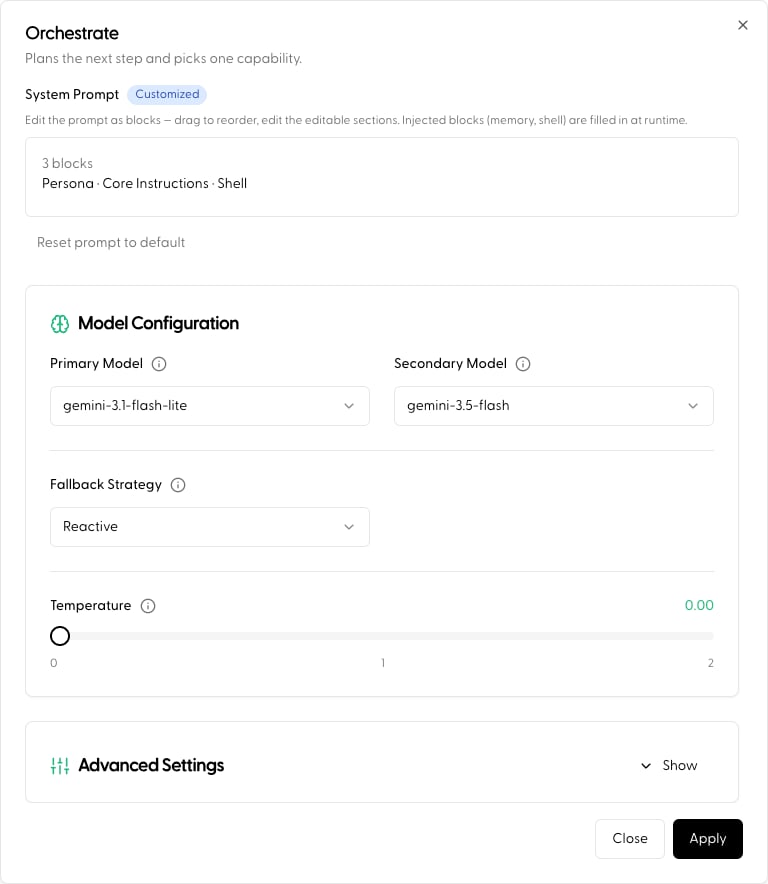 * **System prompt**: every step ships with Maitai's default prompt template. Edit it to tailor the step to your agent; a badge on the step shows **Default** vs **Customized**, and you can reset back to the default at any time.
* **Model & parameters**: each step runs as its own intent, so each can use its own model and hyperparameters. A common pattern: a fast, cheap model for **Orchestrate** and **Process**, and a premium model for **Respond**.
Guidance that previously lived in "special instructions" now belongs directly in the step prompts:
* Prioritization logic, checklists before calling tools go in **Orchestrate**
* How to interpret and synthesize capability results goes in **Process**
* Tone, formatting, and response policy go in **Respond**
* Structured JSON answer shape (schema) goes in **Respond**, under **Response Format**
Flow steps run through your Application like any other intent, which means each step shows up in [request monitoring](/observe/request_overview) and can be independently fine-tuned over time.
## Toggling optional steps
**Process** and **Progress Probe** have switches directly on the pipeline. Turning Process off trades context quality for latency; turning Progress Probe on trades latency for tighter loop control.
## Per-request overrides (SDK)
You can toggle flow steps for a single request without touching the published agent, for example, skipping the Progress Probe on a latency-sensitive call:
```python theme={null}
agent = client.agent.get("YOUR_AGENT_NAME", version="prod")
agent.config.system_steps.progress = False
request = agent.to_request(messages=[...], session_id="YOUR_SESSION_ID")
response = client.agent.completions.create(request=request)
```
The step keys are `orchestration`, `processing`, `progress`, and `respond`. Overrides are validated against the published version and only whitelisted toggles apply (see [Agent Call) per-request overlays](/sdk/agent_call#per-request-overlays-agent-get).
## Next
* Define the fields your agent maintains: [Agent State](/build/agents/agent_state)
* Full walkthrough: [Build an Agent](/examples/build_agent)
* **System prompt**: every step ships with Maitai's default prompt template. Edit it to tailor the step to your agent; a badge on the step shows **Default** vs **Customized**, and you can reset back to the default at any time.
* **Model & parameters**: each step runs as its own intent, so each can use its own model and hyperparameters. A common pattern: a fast, cheap model for **Orchestrate** and **Process**, and a premium model for **Respond**.
Guidance that previously lived in "special instructions" now belongs directly in the step prompts:
* Prioritization logic, checklists before calling tools go in **Orchestrate**
* How to interpret and synthesize capability results goes in **Process**
* Tone, formatting, and response policy go in **Respond**
* Structured JSON answer shape (schema) goes in **Respond**, under **Response Format**
Flow steps run through your Application like any other intent, which means each step shows up in [request monitoring](/observe/request_overview) and can be independently fine-tuned over time.
## Toggling optional steps
**Process** and **Progress Probe** have switches directly on the pipeline. Turning Process off trades context quality for latency; turning Progress Probe on trades latency for tighter loop control.
## Per-request overrides (SDK)
You can toggle flow steps for a single request without touching the published agent, for example, skipping the Progress Probe on a latency-sensitive call:
```python theme={null}
agent = client.agent.get("YOUR_AGENT_NAME", version="prod")
agent.config.system_steps.progress = False
request = agent.to_request(messages=[...], session_id="YOUR_SESSION_ID")
response = client.agent.completions.create(request=request)
```
The step keys are `orchestration`, `processing`, `progress`, and `respond`. Overrides are validated against the published version and only whitelisted toggles apply (see [Agent Call) per-request overlays](/sdk/agent_call#per-request-overlays-agent-get).
## Next
* Define the fields your agent maintains: [Agent State](/build/agents/agent_state)
* Full walkthrough: [Build an Agent](/examples/build_agent)