> ## Documentation Index
> Fetch the complete documentation index at: https://docs.trymaitai.com/llms.txt
> Use this file to discover all available pages before exploring further.
# Agent State
> Structured, session-scoped memory your agent maintains and acts on
**Agent State** is a set of typed fields the agent is responsible for keeping up to date throughout a session. Define the fields on the agent's **State** tab in the Portal; the agent fills them in as it converses and runs capabilities.
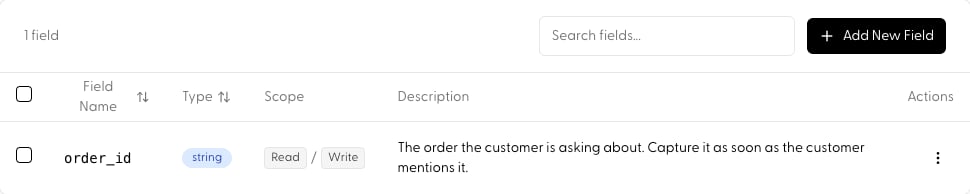 State acts as a structured scratchpad that persists across turns, so the agent never loses track of critical information, and it feeds directly into how the agent behaves:
* **Orchestration**: in `reasoning` mode, the planner sees current state when deciding what to do next, and the **Process** step writes updates back after each action.
* **Routing**: in `route` mode, rules-based routing can match on state values (e.g. route to the billing action once `order_id` is set).
* **SDK**: read resolved state and seed values per request via `agent.get` (see below).
## Defining a field
State acts as a structured scratchpad that persists across turns, so the agent never loses track of critical information, and it feeds directly into how the agent behaves:
* **Orchestration**: in `reasoning` mode, the planner sees current state when deciding what to do next, and the **Process** step writes updates back after each action.
* **Routing**: in `route` mode, rules-based routing can match on state values (e.g. route to the billing action once `order_id` is set).
* **SDK**: read resolved state and seed values per request via `agent.get` (see below).
## Defining a field
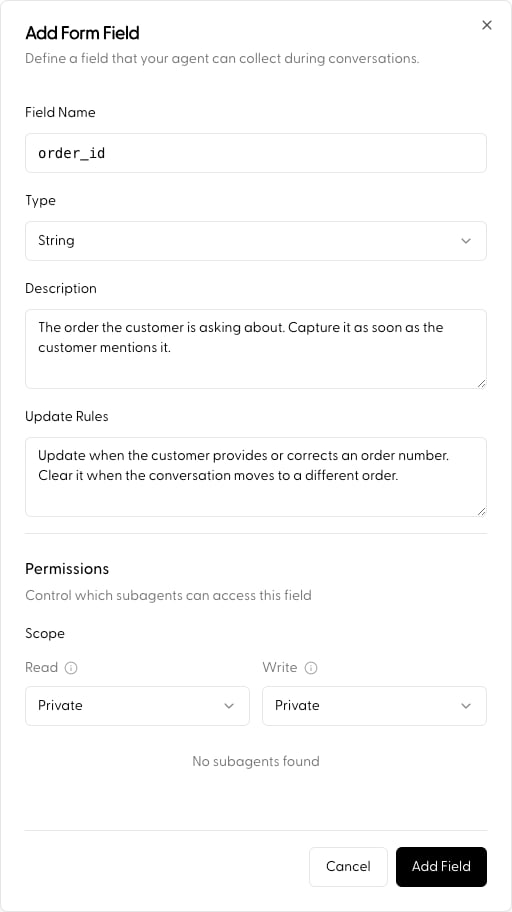 Each state field has:
* **Name**: how the agent and your code reference the field (e.g. `order_id`).
* **Description**: what the field holds and when to fill it. The agent relies on this, so be specific.
* **Type**: `string`, `number`, `boolean`, or `date`. Values written from the SDK are validated against this type.
* **Update Rules** (optional), extra guidance for when and how the agent should update the value.
* **Read / Write Scope**: access control, below.
## Access control (ACLs)
Each field carries its own ACL controlling which agents in the hierarchy can see or modify it, critical for data integrity in multi-agent workflows.
* **Read Scope**: who can view the field's value.
* **Write Scope**: who can update it. Write access requires read access.
Both scopes support three levels:
1. **Private** (default): only the agent that defines the field can access it. Best for internal session state that sub-agents shouldn't see.
2. **Public**: any agent in the session hierarchy can access the field. Useful for shared context like `user_id` or `session_language`.
3. **Custom**: explicitly select which sub-agents get access, a "need-to-know" architecture where data is only shared with the specialists that require it.
### Use cases
* **Data isolation**: keep sensitive internal reasoning **Private**.
* **Selective delegation**: share `payment_token` with only the "Billing" sub-agent via **Custom**, hidden from "General Support".
* **Global context**: make essential metadata **Public** so every agent in the tree can use it.
## Seeding state from code
You can read an agent's resolved state and seed field values for a single request through the SDK:
```python theme={null}
agent = client.agent.get("YOUR_AGENT_NAME", version="prod")
agent.state["user_facts"] = "VIP customer since 2021"
request = agent.to_request(messages=[...], session_id="YOUR_SESSION_ID")
response = client.agent.completions.create(request=request)
```
Patches are field-level and validated against the field types defined on the State tab: absent keys are untouched, and an explicit `None` clears a field. See [Agent Call, per-request overlays](/sdk/agent_call#per-request-overlays-agent-get).
## Next
* Guide the steps that read and write state: [Agent Flow Steps](/build/agents/agent_flow)
* Full walkthrough: [Build an Agent](/examples/build_agent)
Each state field has:
* **Name**: how the agent and your code reference the field (e.g. `order_id`).
* **Description**: what the field holds and when to fill it. The agent relies on this, so be specific.
* **Type**: `string`, `number`, `boolean`, or `date`. Values written from the SDK are validated against this type.
* **Update Rules** (optional), extra guidance for when and how the agent should update the value.
* **Read / Write Scope**: access control, below.
## Access control (ACLs)
Each field carries its own ACL controlling which agents in the hierarchy can see or modify it, critical for data integrity in multi-agent workflows.
* **Read Scope**: who can view the field's value.
* **Write Scope**: who can update it. Write access requires read access.
Both scopes support three levels:
1. **Private** (default): only the agent that defines the field can access it. Best for internal session state that sub-agents shouldn't see.
2. **Public**: any agent in the session hierarchy can access the field. Useful for shared context like `user_id` or `session_language`.
3. **Custom**: explicitly select which sub-agents get access, a "need-to-know" architecture where data is only shared with the specialists that require it.
### Use cases
* **Data isolation**: keep sensitive internal reasoning **Private**.
* **Selective delegation**: share `payment_token` with only the "Billing" sub-agent via **Custom**, hidden from "General Support".
* **Global context**: make essential metadata **Public** so every agent in the tree can use it.
## Seeding state from code
You can read an agent's resolved state and seed field values for a single request through the SDK:
```python theme={null}
agent = client.agent.get("YOUR_AGENT_NAME", version="prod")
agent.state["user_facts"] = "VIP customer since 2021"
request = agent.to_request(messages=[...], session_id="YOUR_SESSION_ID")
response = client.agent.completions.create(request=request)
```
Patches are field-level and validated against the field types defined on the State tab: absent keys are untouched, and an explicit `None` clears a field. See [Agent Call, per-request overlays](/sdk/agent_call#per-request-overlays-agent-get).
## Next
* Guide the steps that read and write state: [Agent Flow Steps](/build/agents/agent_flow)
* Full walkthrough: [Build an Agent](/examples/build_agent)